Select plan · Register SIM · Add billing · Port-in · Service activation
Belong SIM activation: one journey, the whole service
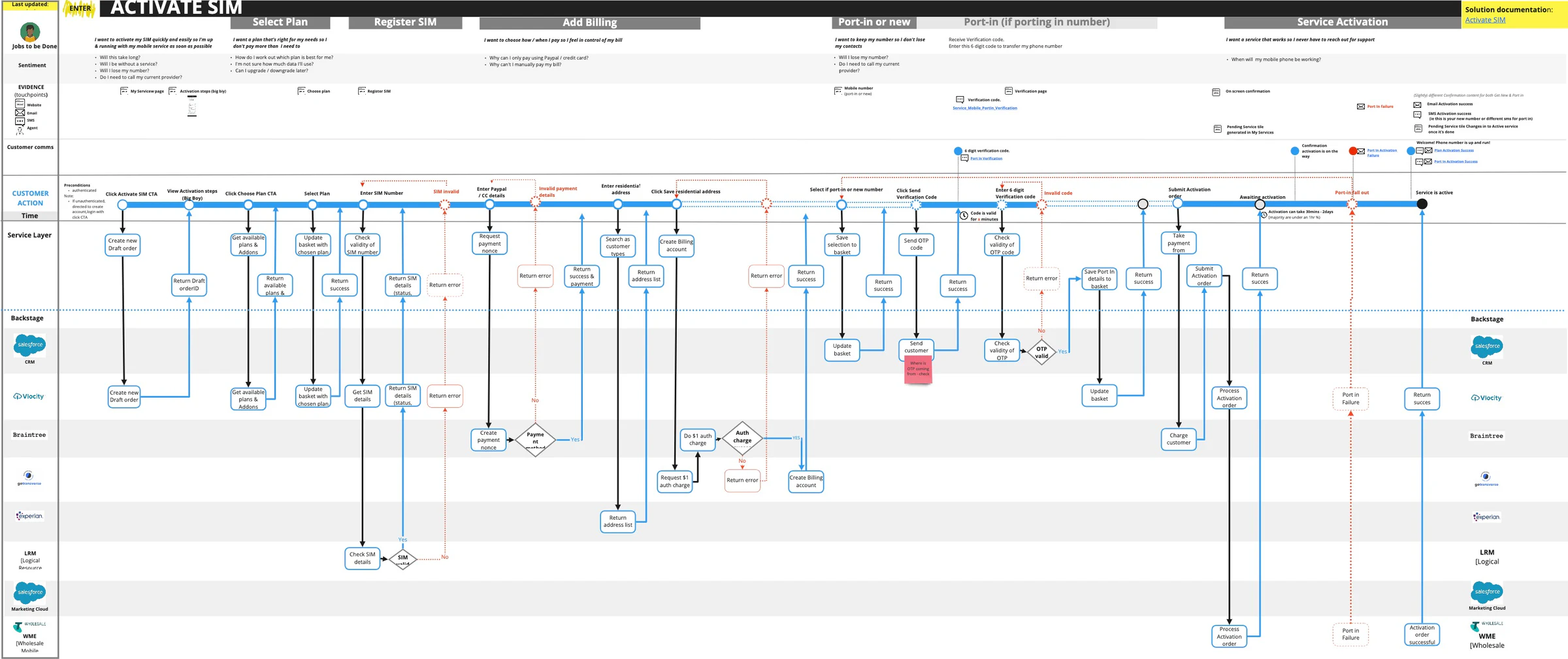
To the customer, it is one task: get my mobile working. Inside the service, that task crosses plan selection, SIM validation, payments, number transfer and network activation.
This guided walkthrough uses the real Belong service blueprint and five experience principles. Choose a failure, follow its hand-offs and test what a coordinated response would require.
Viewing time
About 4 minutes
Professional capability shown
Ecosystem Design: connecting customer intent to product decisions, technical dependencies, service ownership and customer communication.
- Source
- Real Belong project
- Explore
- 5 stages · 4 service layers
- Decision tests
- 5 experience principles
The source blueprint and principles are real. Decision tests and team change briefs are proposed examples, not a record of implemented changes.
The real project · Belong, Australia
One person activating a SIM.
A whole service responding.
Based on the published Belong SIM activation blueprint. Stage summaries are condensed; failure paths retain the systems shown in the source. This is a historical service model, not a live activation tool.
Ecosystem Design · 01 / 04
Start with the journey. Reveal the service.
Select a stage, reveal the layers underneath it, then trace a documented failure. The customer experiences one activation; the work crosses several systems.
Stage Selection
Activation stages with the customer need and service interactions at each point. Blueprint detail shows the selected stage.
Review the customer need, or select another stage to investigate.
Customer need · Select plan
“I want a plan that’s right for my needs so I don’t pay more than I need to.”
Layer Selection
Customer actions, touchpoints, service responses and backstage systems in the activation journey.
Select the layers to show in the blueprint.
Failure Selection
Known activation failures and the systems and hand-offs involved.
Choose a failure. Select Normal path to clear the trace.
The highlighted trace is a condensed reading of the source, not a complete technical architecture.
Customer actions
What the person does
Choose a plan
Enter SIM number
Enter payment details and residential address
Keep a number or get a new one; verify if porting
Submit order; wait for service to become active
Touchpoints
What they see or receive
Choose-plan screen
Register-SIM screen
Payment and address entry in the activation flow
Number selection and verification page
Six-digit verification code by SMS
Confirmation and pending / active service tile
Activation-success SMS / email, or port-in failure email
Service responses
What the service does
Get plans and add-ons; update basket
Check SIM validity; return details or error
Validate payment; find address; create billing account
Send and check code; save port-in details
Take payment; submit order; return status
Backstage systems
What makes it possible
Vlocity
Return plans and save selection
Vlocity
Get SIM details; return status
LRM
Check whether the SIM is valid
Braintree
Create payment nonce; $1 authorisation
Experian
Return address suggestions
gotransverse
Request authorisation; create account
Salesforce CRM
Update basket; send and validate code
Vlocity
Update basket after valid verification
Braintree
Charge customer
Vlocity
Process order; return success or port-in failure
WME (Wholesale Mobile)
Process network activation
The wider system landscape
8 named systems in the sourceSalesforce CRM
Basket and verification
Vlocity
Plans, SIM details and orders
Braintree
Payment and authorisation
gotransverse
Billing account
Experian
Address lookup
LRM
SIM-validity check
Salesforce Marketing Cloud
Source lane; no connected activity shown
WME (Wholesale Mobile)
Network activation
Ecosystem Design · 02 / 04
Use a principle to test the response.
Belong’s five experience principles express how the customer should feel. Select one, then compare an interface-only response with a change across the service.
Principle Selection
Experience principles used to assess service decisions.
Select a principle, then inspect its photograph and decision test.
Decision tests and change briefs are proposed for this walkthrough. They are not a record of approved or delivered Belong changes.
Ecosystem Design · 03 / 04
Change the service together.
The final brief carries the selected failure and principle into proposed team responsibilities, dependencies, customer communications and an acceptance check.
From evidence to owned work
The brief follows your decisions.
Choose a failure, apply an experience principle and test a response. Then build the brief to see what must change together.
Choose a failure ↑Ecosystem Design · 04 / 04
One blueprint coordinates the whole ecosystem.
The service blueprint stayed in sync with a redesigned front-end stack, a design system, a headless CMS and a distributed UX chapter.
Increased
Mobile SIM sales
Adopted
Customer self-service
Reduced
Call volumes
10× faster
Offers and campaigns to market
These are documented outcomes of the wider front-end and UX capability programme. They are not attributed to a single blueprint intervention or to the proposed changes in this demo. Public percentage changes for sales, self-service and call volumes are not available.
Read the Belong case study and before-and-after evidence →Start a conversation
Where does your service lose the customer’s context?
Bring one customer-facing failure. I can help trace the systems, decisions and owners that need to change together.